


Burn Rate Calculator & Guide
Understanding your startup’s cash burn shouldn’t require a finance team. Use Numinor’s burn rate calculator to estimate monthly cash consumption, runway, and how quickly you need to adjust spending.
This quick burn rate calculation helps founders and operators plan hiring, marketing, and milestones with confidence—plus gives investors a clear, consistent metric they expect to see.

Burn Rate Calculator & Guide
Use this burn rate calculator to estimate how much cash your business consumes each month and how many months of runway you have based on your current cash balance. It’s designed for founders and operators who want a fast answer—and a clear starting point for planning.
Enter your monthly operating expenses and monthly revenue, then add your current cash on hand. The calculator will show:
Gross Burn (monthly expenses)
Net Burn (expenses minus revenue)
Estimated Runway (months)
If your results show limited runway, Numinor can help you turn the numbers into a plan—prioritize expenses, model hiring timing, and forecast scenarios for fundraising or revenue growth.
INSTRUCTIONS
Enter the cash balance at the end of the last 3 months. (You can add up to 12 months for more accuracy).
Here is how your burn rate and runway have varied over the last 3 months.
| MONTH | BURN RATE | RUNWAY AT THIS BURN |
|---|
If you prefer to do it manually, here’s how to calculate burn rate step by step:
How to Calculate Burn Rate
1) Collect your financial data
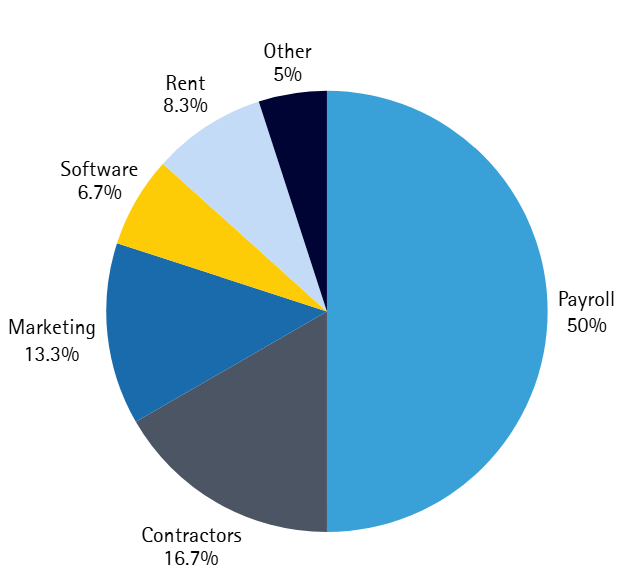
Pull the last 3–6 months of bank statements, income, and operating expenses. Include payroll, contractors, software, rent, marketing, professional services, and any debt payments.
2) Choose a time period
Most startups use monthly burn because it aligns with payroll and reporting. For early-stage businesses, averaging across multiple months can smooth one-time spikes.
3) Apply the formula
For a basic approach:
Burn Rate = Cash Spent ÷ Time Period
For a more practical operating view (net burn):
Net Burn = Monthly Expenses – Monthly Revenue
This burn rate calculation shows whether you’re consuming cash and by how much.
4) Interpret the results
A higher burn rate isn’t always bad—it depends on growth strategy and access to capital. The key is knowing your runway:
Runway = Cash on Hand ÷ Net Burn
Types of Burn Rate
Two metrics are commonly used in startup reporting, and each supports a different burn rate calculation:

Gross Burn
This is your total monthly cash outflow—how much you spend each month, regardless of revenue.
Gross Burn = Total Monthly Expenses
Net Burn
This is the monthly cash you lose after accounting for revenue. It’s the best indicator of runway.
Net Burn = Total Monthly Expenses – Monthly Revenue
A company can have a high gross burn (large team, heavy investment) while keeping net burn manageable if revenue is growing. Tracking both helps you make smarter decisions about hiring, marketing, and timing for fundraising.
Why Monitoring Burn Rate is Critical
Burn rate is more than a number—it’s an early warning system. When you understand your burn rate calculation and runway, you can make decisions before you’re forced into them.
Protect cash flow: identify cost creep, subscription bloat, and hiring timing risks
Build investor confidence: consistent burn + runway tracking is standard in board updates
Make strategic choices: choose growth investments intentionally (not accidentally)
Avoid emergency fundraising: low runway reduces negotiating leverage and increases dilution
Scenario thinking matters. For example, reducing net burn from $80,000/month to $60,000/month increases runway by 33%—often the difference between hitting a milestone or fundraising too early. If you’re unsure how to calculate burn rate consistently across months, Numinor can help set up a repeatable model and reporting cadence.
Tips to Reduce Burn Rate
If your burn rate calculation shows runway risk, small changes can create meaningful breathing room:

Renegotiate vendors and tools: consolidate software, reduce seats, switch annual plans strategically

Optimize headcount costs: pause non-critical hiring, rebalance contractor vs full-time, adjust timelines

Reduce overhead: revisit office costs, benefits, travel, and recurring subscriptions

Make marketing more efficient: shift spend to highest-converting channels, improve attribution, test smaller experiments

Improve cash collection: tighten invoicing terms, follow-ups, and payment methods
FAQs
-
To understand how to calculate burn rate, start with your monthly expenses and revenue. Gross burn is total monthly expenses. Net burn is expenses minus revenue. For runway, divide cash on hand by net burn.
-
There isn’t one universal answer. A “safe” burn rate depends on your stage, revenue traction, and fundraising plans. Many startups aim to maintain enough runway to reach the next major milestone (often 9–18 months), but the right target is specific to your growth strategy and market conditions. Use a consistent burn rate calculation and track runway monthly.
-
Burn rate influences hiring, marketing investment, product timelines, and fundraising timing. A higher burn rate can accelerate growth if it’s deliberate and funded—but it can also create pressure if runway shrinks too fast. If your burn rate calculator results show limited runway, scenario planning can help you decide what to cut, what to keep, and what to double down on.
Want a Burn Rate Template You Can Reuse Every Month?
Download Numinor’s startup runway spreadsheet and simplify your monthly burn rate calculator workflow—expenses, net burn, runway, and scenario planning in one place.
Prefer a guided review? Our CFO advisory team can help you build a burn model investors trust and a plan your team can execute.